

A website functions through a continuous digital conversation between a client browser and a remote web server. When you enter a web address, specialized systems translate that name into a numerical IP address. Your device then connects to the server to download and display the requested digital files.
The Mechanics of Web Architecture and Data Routing
The internet operates on a strict client-server model where browsers request data and servers deliver it. This underlying architecture relies on standardized communication protocols to transmit data packets seamlessly across global networks.
Understanding the Client-Server Relationship
To truly understand website basics, you must first grasp the core client-server model. Your smartphone or laptop acts as the “client” in this digital relationship. The browser software you use initiates requests for specific web content. The “server” is a powerful, centralized computer storing those website files. It actively listens for incoming client requests around the clock. When a request arrives, the server retrieves the necessary data. It then transmits this data back to your device for immediate rendering. This rapid exchange forms the fundamental basis of how websites work today. According to the Mozilla Developer Network (MDN) Web Mechanics guide, this process relies on complex physical infrastructure. Fiber-optic cables, network switches, and localized routers physically connect these machines globally. This physical hardware backbone is what we broadly call the internet. The World Wide Web is simply the collection of pages accessed via this network.
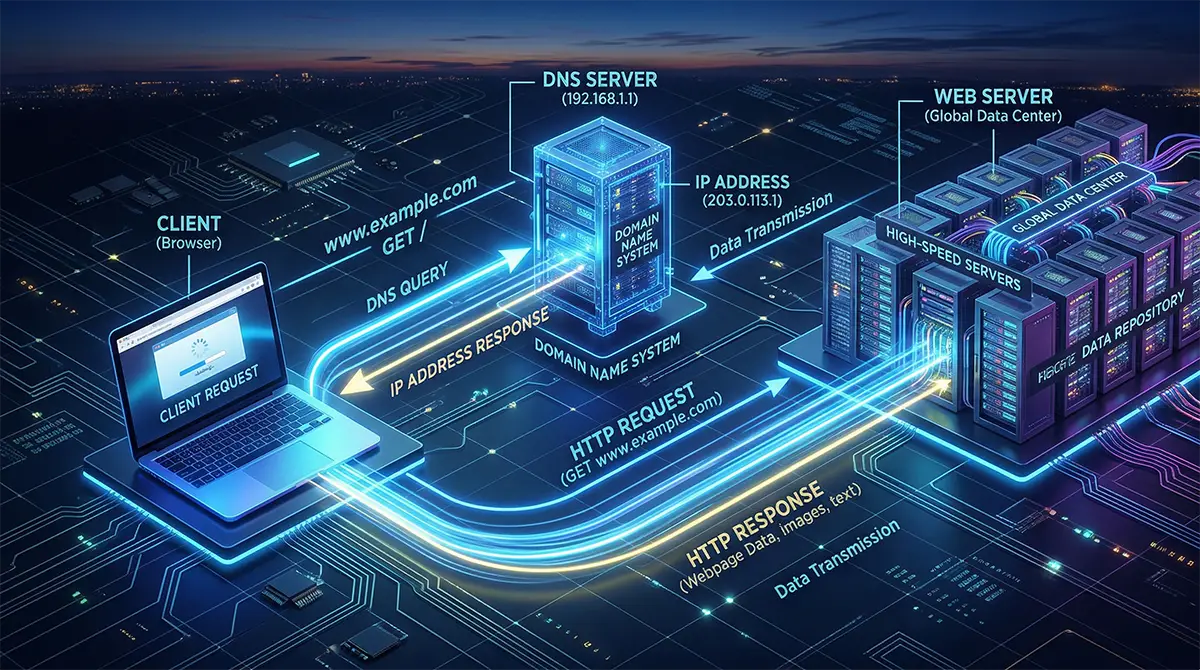
The Domain Name System (DNS) Resolution Process
Computers do not understand human-readable web addresses like webhostradar.com. They strictly communicate using numerical identifiers known as Internet Protocol (IP) addresses. The transition from older IPv4 addresses to modern IPv6 is currently underway globally. This shift provides an essentially infinite number of unique IP addresses for devices. Memorizing complex numerical IP addresses for every website is impossible for humans. The Domain Name System (DNS) solves this by acting as the internet’s phonebook. When you type a URL, your browser queries a specialized DNS server. This server instantly translates the domain name into its corresponding IP address. The Cloudflare DNS Architecture Guide thoroughly details this intricate four-step resolution process. The query travels from a local recursor to an authoritative nameserver. Once the correct IP address is located, it returns to your local browser. Your device finally knows exactly which remote server to contact.
Establishing the TCP/IP Handshake
After securing the correct IP address, the browser initiates a direct connection. It uses Transmission Control Protocol (TCP) and Internet Protocol (IP) rules. These fundamental protocols govern exactly how data travels across the sprawling internet. The client and server perform a digital “handshake” to synchronize their communication. They establish a reliable, heavily verified connection before transmitting any sensitive data. This handshake ensures that data packets arrive sequentially and completely intact. If a single packet drops during transit, the protocol automatically requests retransmission. This rigorous verification prevents corrupted images or broken HTML from rendering locally.
Rendering Files via HTTP Requests
Once the TCP connection is secure, the browser sends an HTTP request. Hypertext Transfer Protocol (HTTP) defines the actual language for these digital requests. The server processes this request and locates the specific HTML document. It packages the HTML, along with associated CSS and JavaScript files. These files are then sent back to the browser as an HTTP response. The browser’s internal engine systematically parses the document object model (DOM) structure. It constructs a visual render tree mapping out every single visual element. Finally, the browser paints these pixels onto your screen in precise order. This entire complex sequence usually happens in a fraction of a second.
Security and HTTPS Encryption
Modern web architecture heavily prioritizes data security during these transmission phases. Standard HTTP sends all data packets in plain, easily readable text format. Malicious actors can easily intercept and read this raw unencrypted data. Secure HTTP (HTTPS) utilizes Transport Layer Security (TLS) to encrypt the connection. This mathematical encryption scrambles data between the client and the server entirely. It guarantees that passwords and personal data remain completely confidential during transit.
The Economics of Website Ownership and Hosting
Owning a website requires investing in specific digital assets like domain names and server hosting. The financial return on investment relies on choosing the correct scalable infrastructure for your specific traffic needs.
The Cost of Digital Real Estate
Building a digital presence requires purchasing a unique domain name first. This domain acts as your exclusive digital property address on the internet. In India, popular extensions like dot-in or dot-com cost a few hundred rupees annually. This minimal investment secures your brand identity across the global network architecture. However, a domain name alone does not make a website functional. You must rent physical server space to store your actual website files. This practice is universally known in the tech industry as web hosting. Hosting providers maintain massive data centers with redundant power and internet connections. They charge a monthly or annual fee to keep your site online constantly.
Evaluating Web Hosting Tiers
Shared hosting is the most economical entry point for CS students. Multiple websites share the exact same server resources, minimizing overall hardware costs. It is highly affordable but can lead to slower performance during traffic spikes. Virtual Private Servers (VPS) offer a more robust mid-tier solution. A physical server is digitally partitioned, granting you dedicated, isolated computing resources. This provides better stability and security for growing local e-commerce businesses. Cloud hosting represents the absolute pinnacle of modern server architecture. Your site is hosted across a massive network of interconnected servers globally. If one server fails, another instantly takes over to ensure zero downtime. Dedicated server hosting offers the ultimate level of raw computing performance. You rent an entire physical machine exclusively for your specific corporate website. This tier requires specialized system administrators to manage and secure the hardware.
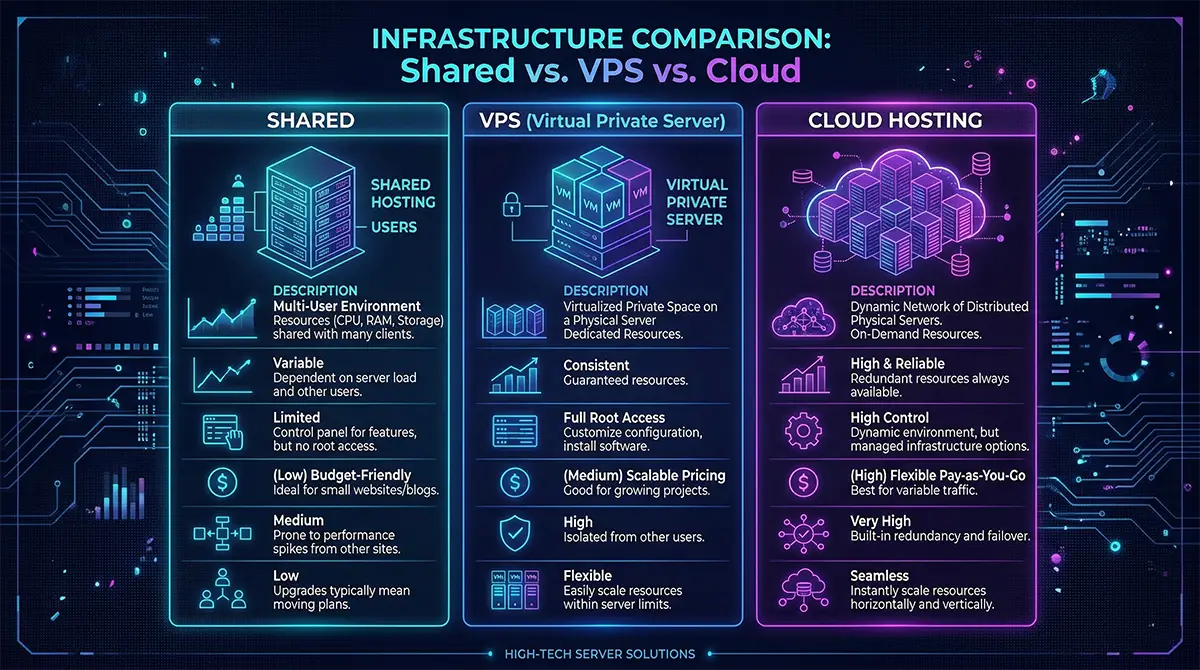
Analyzing Infrastructure ROI
Choosing the right infrastructure dictates the total cost of ownership over time. As outlined in the AWS Architecture Blog regarding URL journeys, latency heavily impacts user retention. Slow servers directly cause visitors to abandon your page before it even loads. Investing in premium hosting ensures fast TCP handshakes and rapid data delivery. This directly improves conversion rates for digital storefronts and freelance portfolios. High-quality infrastructure acts as a revenue multiplier rather than a simple expense. Factoring in maintenance costs is also crucial for long-term website ownership. Content Management Systems (CMS) like WordPress require regular security updates and backups. Premium managed hosting plans handle these technical updates automatically for a fee. Let us examine the general financial breakdown for launching a modern site.
| Infrastructure Type | Average Annual Cost (INR) | Best Use Case | Performance Level |
|---|---|---|---|
| Shared Hosting | ₹1,500 - ₹3,500 | College projects, personal blogs | Basic (Slows under heavy load) |
| VPS Hosting | ₹6,000 - ₹15,000 | Mid-sized D2C stores, portfolios | High (Dedicated virtual resources) |
| Cloud Hosting | ₹12,000 - ₹40,000+ | High-traffic enterprise applications | Maximum (Auto-scaling capabilities) |
| Domain Name | ₹500 - ₹1,200 | Brand identity and routing | N/A (Required for all tiers) |
Comparative Analysis of Web Architectures
Modern websites are generally built using either static file architecture or dynamic server-side processing. Selecting the right architectural approach dictates how the server constructs and delivers data to the client browser.
The Mechanics of Static Websites
Static websites represent the simplest, most fundamental form of web architecture available. The server stores pre-built HTML, CSS, and JavaScript files directly on its hard drive. When a browser requests a page, the server simply returns the exact file. No complex database queries or background server-side processing occur during this transaction. This makes static sites incredibly fast, secure, and cheap to host globally. They are perfect for basic documentation, simple portfolios, or informational landing pages. However, static sites cannot adapt their content based on user behavior automatically. Every single visitor sees the exact same information when they load the page. Updating content requires developers to manually edit the underlying HTML files directly.
| Specification | Static Architecture Details |
|---|---|
| Data Delivery | Pre-rendered files sent directly to the client |
| Database Requirement | None required for basic operation |
| Hosting Cost | Extremely low (often free via GitHub Pages) |
| Ideal Application | Resumes, college project documentation, landing pages |
The Mechanics of Dynamic Websites
Dynamic websites construct pages in real-time based on specific user requests. This is how platforms like Facebook, Amazon, or college portals operate daily. The MDN Server-Side Architecture documentation explains this complex interaction perfectly. The server uses backend languages like Python, PHP, or Node.js. It actively queries a database to retrieve specific user data or product details. The server then injects this raw data into an HTML template instantly. Finally, it sends this freshly generated, personalized HTML page back to the browser. This allows for user logins, shopping carts, and highly customized content feeds. It requires significantly more computing power and sophisticated server management techniques.
| Specification | Dynamic Architecture Details |
|---|---|
| Data Delivery | Pages assembled in real-time on the server |
| Database Requirement | Mandatory (MySQL, PostgreSQL, MongoDB) |
| Hosting Cost | Moderate to High (Requires database computing power) |
| Ideal Application | E-commerce, social networks, SaaS platforms |
Comparing Performance and Scalability
Static sites inherently handle massive traffic spikes with incredible efficiency and grace. Content Delivery Networks (CDNs) can easily cache and distribute static files globally. This means users download the site from a server geographically closest to them. Dynamic sites struggle significantly more during sudden, massive influxes of user traffic. The server must process thousands of simultaneous database queries under heavy load. This computational bottleneck often causes dynamic sites to crash without auto-scaling architecture.
The Rise of Hybrid Architectures
Modern developers frequently combine both approaches using a hybrid architectural model. They pre-render core pages statically for maximum speed and basic SEO performance. They then use JavaScript to fetch dynamic data only when strictly necessary. This approach bridges the gap between raw speed and personalized user experiences. Indian startups heavily favor this modern architecture to optimize high mobile traffic.
Frequently Asked Questions
01 What exactly happens behind the scenes when I type a URL into a browser?
Your browser queries a DNS server to find the target IP address. It then establishes a TCP connection and sends an HTTP request. Finally, the remote server returns the website files for local rendering.
02 What is the difference between the Internet and the World Wide Web?
The internet is the physical global network of connected computers and cables. The World Wide Web is the collection of digital pages and documents. The web operates securely on top of the physical internet infrastructure.
03 How does the Client-Server model function in modern web architecture?
Your personal device acts as the client requesting specific digital information. A powerful centralized computer acts as the server providing that exact information. They communicate continuously using standardized data transfer protocols over the network.
04 How do DNS servers translate human-readable domain names into IP addresses?
DNS acts exactly like a massive digital phonebook for the internet. It takes a domain name and cross-references it against massive global directories. It then returns the specific numerical IP address needed for server connection.
05 What role do HTTP and TCP/IP play in transferring data packets?
TCP/IP protocols handle the precise physical routing and reliable delivery of data packets. HTTP acts as the higher-level language used to request specific web documents. Together, they ensure data arrives intact and is understood by the browser.
06 How do front-end code and back-end servers work together?
Back-end servers handle database queries, security authentication, and raw data processing. They send HTML, CSS, and JavaScript files down to the client device. The front-end browser then interprets those files to render the visual interface.