
New e-commerce entrepreneurs lose up to 70% of potential revenue daily. This happens due to invisible friction points in their checkout flow, not bad products. Simple mistakes like forcing account creation kill conversions before a customer enters their credit card. But the biggest revenue drain isn’t what you are missing—it’s what you are actively forcing your users to look at right before they buy.
🚀 Key Takeaways
- Friction equals abandonment: Forcing users into a rigid checkout flow is the fastest way to spike your Cart Abandonment Rate.
- Mobile is unforgiving: Tiny technical delays like Payment Gateway Latency instantly destroy trust on standard cellular networks.
- Less is more: Streamlining your digital wallet stack converts exponentially better than offering every payment method imaginable.
Why Your Traffic Isn’t Turning Into Cash
High traffic with zero sales usually points to severe checkout friction, broken mobile responsiveness, or a lack of trust signals during the final payment steps.
The Illusion of a Finished Store
You might think your website is ready because the theme looks great on your desktop monitor. However, most of your customers are navigating your site on their smartphones over spotty cellular connections. In this unforgiving mobile environment, minor annoyances quickly amplify into absolute deal-breakers.
A single instance of Cumulative Layout Shift (CLS) can move the “Buy Now” button unexpectedly. This frustrates the user enough to leave your site and never return.
The True Cost of Checkout Friction
Every extra second your payment processor takes to load chips away at user trust. Every unnecessary form field you demand also destroys their buying momentum. We call this Checkout Friction. It is about respecting the user’s time and cognitive load, not just making things look pretty.
If Payment Gateway Latency makes a buyer wait more than three seconds, their brain registers danger. They will assume the transaction is insecure, close the tab, and take their money elsewhere.
Recognizing the Warning Signs
The first indicator of a broken funnel is a high add-to-cart rate paired with an abysmal completion rate. You are successfully convincing people they want your product. Your marketing is clearly working. But the mechanical process of actually taking their money is failing.
Identify these silent errors early to plug the leaks in your sales funnel. You can immediately boost baseline revenue without spending extra dollars on advertising.
Why Shoppers Flee Before Paying
A high Cart Abandonment Rate happens when checkout friction, unexpected costs, or complex payment choices overwhelm the buyer. Simplifying the steps directly increases completed purchases and boosts your store’s baseline revenue.
The Danger of Too Many Choices
New store owners often believe that offering every possible payment option increases conversions. This is a massive misconception. We call this the Payment Method Paradox. Presenting a shopper with fifteen different ways to pay actually creates severe decision fatigue.
When a buyer is ready to complete a purchase, their brain wants the path of least resistance. Staring at a massive grid of digital wallets, finance options, and credit card inputs forces them to pause. This pause is dangerous. It gives them time to second-guess their purchase or check a competitor’s price. You want to eliminate any hesitation during this critical final step.
How Visual Instability Ruins Sales
Beyond psychology, cluttering your checkout with endless payment buttons causes immediate technical issues. Each third-party payment badge requires external scripts to load. On slower mobile networks, these buttons load at completely different speeds.
This staggered loading creates severe Cumulative Layout Shift (CLS). The screen physically jumps around while the user is trying to tap. Imagine a customer aiming for the standard checkout button, but the screen shifts. They accidentally tap a delayed finance option they did not want. This highly frustrating experience destroys trust instantly. They will likely abandon the cart rather than navigate back.
Trimming Your Digital Wallet Stack
The most profitable e-commerce stores use a highly curated approach to payments. Instead of throwing every option at the wall, they analyze their core demographic. They offer a streamlined, geo-targeted stack of just two or three digital wallets alongside standard credit card processing.
This minimalist approach drastically reduces Checkout Friction. It keeps the user interface clean and prevents technical glitches on mobile devices. If you sell primarily to US-based iPhone users, Apple Pay is essential. Adding ten obscure regional wallets to that same screen only causes confusion.
The Psychology of a Clean Interface
When you remove the clutter, you guide the user’s eyes directly to the final confirmation button. A clean interface silently communicates professionalism and security. It tells the buyer that your store is modern, efficient, and trustworthy.
By solving the Payment Method Paradox, you rescue sales that were previously lost to pure frustration. This is the easiest way to improve your bottom line without spending more on marketing.
How Screen Jumps Destroy Mobile Sales
Mobile shoppers abandon purchases when overwhelming payment choices cause decision fatigue and slow-loading buttons make the screen jump unexpectedly. A stable, visually clean checkout interface is mandatory for converting smartphone traffic.
When a customer hits your payment screen, they are ready to buy. But bombarding them with twelve different digital wallets completely stalls their momentum. This cognitive overload directly increases your Cart Abandonment Rate. They pause to evaluate which option is best, opening the door for second thoughts. A confused buyer simply does not buy.
The Threat of Cumulative Layout Shift
Beyond psychology, cramming too many buttons into a tiny mobile screen creates severe performance issues. These external payment scripts load at varying speeds. As a result, your page layout violently shifts while the user attempts to tap the final button. We officially call this Cumulative Layout Shift (CLS).
Imagine a customer trying to tap Apple Pay, but the screen suddenly jumps downward. They accidentally click a long-term financing option instead. This jarring experience forces them to hit the back button. They rarely return to finish the transaction. According to CXL’s checkout optimization research, unexpected friction like this plummets conversion rates on cellular networks.

Designing for the Thumb
Remember that mobile shoppers navigate your store with a single thumb. Every tap must be precise and completely effortless. Large, stable buttons clustered in a logical order heavily reduce physical Checkout Friction. Mobile dominance is not a future trend; it is the current reality for online shopping.
If your buttons are too close together, misclicks will absolutely skyrocket. This leads to frustrated users abandoning their carts in anger. Always design your final payment steps for the clumsiest possible mobile user. This defensive design strategy protects your hard-earned revenue from easily avoidable technical glitches. Prioritize the user’s thumbs over offering every niche payment trend available.
The Hidden Trap of Mandatory Registration
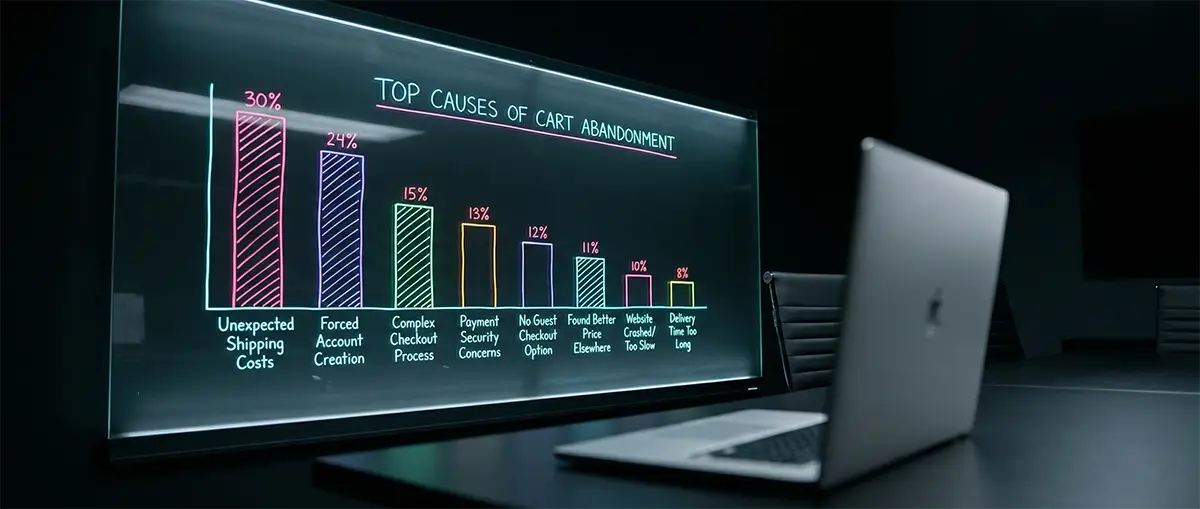
Forcing users to create an account before buying is a massive conversion killer. Shoppers want a fast, anonymous purchase. Demanding a password and profile setup creates severe friction, causing immediate cart abandonment.
Why Buyers Hate Passwords
When a first-time customer decides to buy, they are focused on the product. They are not looking to start a long-term relationship with your brand yet. If your checkout suddenly demands an account creation, you kill their buying momentum. This introduces massive Checkout Friction into the process.
People already have too many passwords to remember. Forcing them to create another one for a single purchase feels like a chore. They will simply abandon the cart and find a competitor who does not demand their life story.
The Power of the Guest Checkout Flow
The most effective way to secure a first-time sale is offering a seamless Guest Checkout Flow. This allows the user to simply enter their shipping and payment details and leave. It respects their time and significantly lowers your Cart Abandonment Rate.
You can always ask them to create an account after the purchase is complete. Simply place a “Save my details for next time” checkbox on the final confirmation page. By moving the registration prompt to the end, you secure the revenue first.
Building Trust Without Registration
Many store owners mistakenly believe that forcing registration builds customer loyalty. In reality, loyalty is built by delivering a great product smoothly. Holding a transaction hostage for an email password creates resentment, not loyalty.
If you want repeat customers, make their first experience completely frictionless. A smooth Guest Checkout Flow proves that you value their convenience over your own data collection. This builds genuine trust far better than a forced signup form ever could.
Why Long Checkout Forms Kill Conversions
Every unnecessary input field you ask a customer to fill out directly decreases your conversion rate. Stripping your checkout form down to just the essential shipping and billing details prevents exhaustion and stops shoppers from abandoning their carts.
Many beginners treat their checkout page like a massive customer survey. They ask for phone numbers, company names, and secondary addresses. This excessive data collection creates massive Checkout Friction. Buyers just want to pay and leave quickly.
The Science of Form Field Optimization
Proper Form Field Optimization is about ruthless minimalism. Combine the first and last name into a single “Full Name” box. Use a single line for the primary street address. Hide the “Company Name” or “Address Line 2” fields behind a small clickable link. This simple trick visually shrinks the form.
A shorter form looks much less intimidating on a compact mobile screen. When a shopper sees only five or six required inputs, they breeze through the checkout process. This psychological win drastically lowers your Cart Abandonment Rate. They feel like they are making rapid, effortless progress toward their goal.
Auto-Fill and Smart Keyboards
You must also design your input boxes to trigger the correct mobile keyboards. If you ask for a zip code, the phone should automatically display the numeric keypad. If you ask for an email address, the keyboard should instantly show the ”@” symbol.
Failing to use these smart triggers forces the user to manually switch keyboard layouts repeatedly. This tiny annoyance adds up quickly on a smartphone, causing unnecessary frustration. Furthermore, your checkout form must perfectly support standard browser auto-fill features. A shopper should be able to populate their entire shipping address with a single, satisfying tap.
The Hidden Cost of the Phone Number Field
Asking for a mandatory phone number is a massive, widely documented conversion killer. People are highly protective of their personal cell phone numbers today. They rightfully fear automated spam texts and unwanted promotional calls.
Unless you absolutely need a phone number for complex freight delivery, make it completely optional. Better yet, remove the phone number field entirely from your flow. Rely strictly on email for shipping updates and digital order confirmations. Respecting their privacy is a crucial step in maintaining buyer momentum. It silently builds brand trust and protects your hard-earned sales revenue.
Why Cold Traffic Flees Your Payment Screen
Shoppers arriving from ads lack built-in trust for new brands. If your checkout page lacks visible security badges, cold traffic will instantly abandon their carts due to a fear of credit card fraud.
Visual Proof of Payment Security
Modern consumers are increasingly aware of online data theft and digital fraud. Before typing their credit card number, they actively look for visual guarantees of safety. This is exactly where verifiable trust badges become your absolute strongest asset.
A simple padlock icon or a dedicated “Secure Checkout” banner drastically calms buyer anxiety. These small but powerful graphics subconsciously signal that your store takes their financial privacy seriously. You must constantly assure them that their payment data is handled by trained professionals. Displaying clear, prominent indicators of strict PCI Compliance proves your store meets rigorous industry standards. It tells the cautious buyer their sensitive data is locked down tight.
The Danger of Fake Trust Signals
However, you must never simply copy and paste low-quality JPEG images from Google searches. Tech-savvy shoppers can easily spot fake, pixelated, or heavily outdated security logos. Using blurry badges actually destroys trust far faster than having no badges at all.
Recognizable, modern payment processors are essential. If you use major gateways, proudly display their official, high-resolution vector logos. These widely recognized icons leverage the processor’s massive brand authority to validate your unknown store. Furthermore, you must ensure your site forces a fully secure SSL/TLS Handshake. If their web browser flags your site as “Not Secure,” absolutely no badge will save the sale.
Strategic Placement for Maximum Impact
Securing the right, high-quality badges is only half of the conversion battle. You must place them exactly where the buyer experiences the highest level of anxiety. Do not hide your crucial security seals down in the footer of your website.
Instead, place them directly underneath or beside the primary credit card input fields. This strategic, highly visible positioning eliminates dangerous hesitation right at the exact point of purchase. It provides a final, necessary push of confidence, heavily reducing last-minute Checkout Friction. By surrounding the final payment button with clear authority signals, you transform terrified cold traffic into confident buyers.
The Cost Shock Causing Massive Buyer Walkouts
Hidden fees at checkout are the number one reason shoppers abandon their carts. Displaying unexpected shipping costs or late tax calculations instantly destroys trust and kills the sale.
The Shipping Calculator Disaster
Many beginner stores force users to input their full address just to see shipping costs. This is a massive mistake that artificially inflates your Cart Abandonment Rate. Shoppers will simply leave rather than fill out a long form just to get a quote.
You must provide a highly transparent shipping estimate early in the process. Consider offering a flat shipping rate or displaying a zip-code-only calculator directly on the cart page. This simple Form Field Optimization keeps the buyer engaged. They know exactly what they will pay before they even start the checkout process.
The Danger of Delayed Tax Application
Taxes are unavoidable, but surprising your customer with them at the final step is deadly. If a buyer thinks their total is fifty dollars, seeing it jump to sixty right before payment causes immediate hesitation. This financial shock is worse than bad site navigation.
To fix this, always calculate and display estimated taxes on the initial cart drawer or page. If geo-location is active, use it to accurately predict regional tax rates instantly. Never wait until the final confirmation button to reveal the true cost of the transaction.
The Power of Free Shipping Thresholds
The absolute best way to eliminate shipping shock is to absorb the cost entirely. However, offering unconditional free shipping is often too expensive for a first-year store. Instead, utilize a strategic free shipping threshold prominently displayed across your site header.
A banner stating “Free Shipping Over $75” sets clear financial expectations immediately. This transparent approach completely removes the mystery from the checkout flow. It also actively encourages customers to add more items to their cart to reach the goal. You eliminate a primary friction point while simultaneously increasing your average order value.
The Silent Danger of Slow Payment Processing
When a payment gateway takes longer than three seconds to process on a cellular network, shoppers assume the transaction failed or their data was stolen. This latency causes immediate panic and severe cart abandonment.
The Panic of the Spinning Wheel
When the payment screen hangs, shoppers panic. They wonder if their money is gone. They worry if a hacker intercepted their credit card details. This fear often causes them to frantically smash the refresh button. Sometimes, they hit the back button to escape the frozen page.
These panicked actions are incredibly dangerous for your store. Refreshing the page can easily break the crucial SSL/TLS Handshake mid-transaction. This leads to accidental double charges or a completely locked cart. Dealing with angry customer service emails about double billing is a nightmare for a solo entrepreneur. You lose the sale and damage your brand reputation simultaneously.
Preventing Cellular Timeouts
You cannot control your customer’s mobile network strength. However, you can control the visual feedback they receive. Always use a highly optimized, modern payment processor that minimizes data transfer.
Provide clear, reassuring visual cues while the transaction processes. Display a smooth loading animation alongside text that explicitly says, “Processing securely, please do not refresh.” This simple communication drastically calms the buyer’s nerves. It manages their expectations and prevents them from interfering with the loading sequence. Fixing these cellular timeout realities instantly lowers your overall Cart Abandonment Rate.
Choosing the Right Infrastructure
Choosing the right gateway infrastructure is a vital technical decision. Legacy payment processors often rely on outdated, bloated API calls. These heavy scripts require massive bandwidth to verify a simple credit card number. This directly causes the frustrating lag that destroys mobile sales.
Modern gateways are specifically engineered for mobile-first routing and low bandwidth environments. They utilize lightweight code that verifies funds almost instantly. This drastically reduces server response times across all global regions. Upgrading your payment infrastructure protects your revenue from silent technical failures.
Why a Lagging Website Scares Away Ready Buyers
Shoppers equate website speed directly with business legitimacy and security. If your site takes longer than three seconds to load, customers will abandon their carts. They fear your payment processing is compromised.
Upgrading Your Foundation
Many beginners buy the cheapest hosting plan available to save money. This is a catastrophic mistake for an e-commerce brand. Cheap shared hosting forces your store to fight thousands of other websites for basic server resources. You must invest in a premium, dedicated hosting environment to guarantee fast response times. Upgrading your underlying infrastructure is the fastest way to eliminate this invisible barrier. A fast, snappy website builds immediate, unspoken trust with your visitors.
Protecting the Final Click
Speed is not just about user experience; it is a core security feature in the buyer’s mind. When the checkout loads instantly, the transaction feels professional and guaranteed. Protect your revenue by monitoring your site speed meticulously. Use free online tools to test your server’s response time from different global locations. If your site lags, fix the underlying infrastructure immediately. Do not let a cheap server ruin a perfectly good sale. Your store’s speed is the silent salesman that either closes the deal or chases the customer away.
How Unsecured Connections Instantly Kill Buyer Trust
If your website lacks a secure padlock icon, modern browsers will block users from entering your store. A missing security certificate instantly triggers a massive warning screen, destroying trust and guaranteeing the shopper will leave without buying.
The Invisible Security Check
When a customer visits your store, their browser talks to your server. They perform a rapid background check called the SSL/TLS Handshake. This invisible process verifies your identity and encrypts the connection. If your server fails this handshake, the browser immediately stops loading the page. The user is left staring at a blank screen or a terrifying error message. This technical failure creates the worst possible Checkout Friction. The shopper never even sees your products, let alone your payment screen.
Why Browsers Punish Unsecured Sites
Google Chrome and Apple Safari heavily penalize stores without proper encryption. If you lack an active SSL certificate, browsers display a bright red “Not Secure” label. This warning sits directly next to your URL in the search bar. No sane buyer will type their credit card details under a giant red warning sign. This immediately maximizes your Cart Abandonment Rate before the user even starts shopping. It makes your brand look incredibly amateurish and dangerous. Securing your domain is not optional; it is the absolute baseline for survival.
Offloading Your Security Burden
The smartest move for a new entrepreneur is offloading this massive risk. You should rely entirely on established payment processors to handle the heavy lifting. Platforms like Shopify or Stripe manage strict PCI Compliance completely on their end. When a user clicks pay, the sensitive data bypasses your servers entirely. The transaction processes securely inside the payment gateway’s impenetrable vault. This allows you to offer a world-class, heavily encrypted checkout experience without hiring a cybersecurity team. You instantly gain the trust and security infrastructure of a multi-billion dollar corporation.
Building a Profitable Checkout Without Breaking the Bank
Fixing your checkout does not require a massive development budget. You can eliminate the most expensive friction points by choosing the right out-of-the-box e-commerce platform that handles security and mobile optimization natively.
Every percentage point of your Cart Abandonment Rate represents stolen revenue. Many beginners try to save money by stringing together free plugins. This strategy ultimately costs thousands in lost sales due to severe Checkout Friction.
The True Price of a Broken Funnel
You must view your software expenses through the lens of retained revenue. A cheap hosting plan might save you thirty dollars a month. However, if it causes slow loading times, it will cost you hundreds in abandoned carts.
Investing in a solid, mobile-first infrastructure guarantees strict PCI Compliance automatically. It prevents technical glitches from ruining the customer journey. Below is a realistic look at how cheap infrastructure compares to a premium setup over a standard month.
| Expense Category | Cheap DIY Setup | Optimized Managed Platform |
|---|---|---|
| Monthly Hosting/Platform Fee | $15 | $39 |
| Premium Checkout Plugins | $50 | Included |
| Lost Revenue (Cart Abandonment) | -$1,200 | -$300 |
| Effective Monthly Cost | $1,265 | $339 |
Choosing Your E-commerce Engine
Selecting the right foundation is the most critical technical decision you will make. You need a system that natively supports a fast Guest Checkout Flow without expensive custom coding. Let us compare the two most dominant solutions in the market today.
Shopify: The E-commerce Specialist
Shopify is a fully hosted, managed solution built specifically for selling online. It practically eliminates back-end maintenance for the store owner. The platform is famous for its highly optimized, one-click checkout system.
| Feature | Shopify Specifications |
|---|---|
| Hosting Speed | Ultra-fast global CDN included. |
| Security | Native, bank-level PCI Compliance. |
| Mobile Experience | Flawless auto-scaling and responsive design. |
| Biggest Advantage | Lowest out-of-the-box Checkout Friction available. |
WooCommerce: The Ultimate Customizer
WooCommerce is a free plugin built on top of WordPress. It offers absolute freedom and ownership over your digital storefront. However, this massive flexibility requires you to manage your own servers and security protocols entirely.
| Feature | WooCommerce Specifications |
|---|---|
| Hosting Speed | Entirely dependent on your chosen web host. |
| Security | Requires manual SSL and firewall management. |
| Mobile Experience | Relies heavily on your specific WordPress theme. |
| Biggest Challenge | Requires active maintenance to prevent latency. |
While WooCommerce is highly powerful, it demands constant technical vigilance. If you ignore basic Form Field Optimization or server updates, your conversion rates will inevitably plummet. Shopify handles this heavy lifting automatically in the background. This allows new entrepreneurs to focus entirely on product marketing and customer acquisition.
Frequently Asked Questions
01 Why are users abandoning my checkout page at the shipping calculator?
Forcing shoppers to input their full address just to see shipping costs creates massive friction. They usually leave immediately rather than wasting time filling out a long form for a simple price quote.
02 How does forced account creation affect first-time buyer conversion?
Demanding a password from a new shopper completely destroys their buying momentum. A mandatory registration process causes severe frustration, forcing them to abandon the cart and seek a faster guest checkout flow elsewhere.
03 What is the optimal number of form fields for a mobile checkout flow?
You should only ask for the absolute minimum details required to process and ship the order. Keeping your form under six fields ensures a fast, frictionless experience that maximizes your mobile conversion rate.
04 How do missing trust badges impact cold traffic sales?
Cold traffic lacks established trust in your brand. If visible security seals are missing near the payment button, they will instantly assume your site is malicious and abandon the purchase out of fear.
05 Does hidden tax calculation cause cart abandonment?
Yes, surprising a buyer with unexpected taxes at the final step creates immediate financial shock. This sudden markup breaks trust and is a primary reason shoppers abandon their carts right before paying.
06 Why is my mobile payment gateway timing out for cellular users?
Heavy payment scripts struggle to load quickly on spotty cellular networks. This payment gateway latency causes the screen to freeze, prompting panicked users to refresh the page or abandon the transaction completely.
07 How do slow DNS response times affect initial page load and buyer trust?
A slow initial server connection makes your entire website feel sluggish and broken. Shoppers immediately associate this technical lag with poor security, destroying their confidence before they even reach the checkout screen.